FREE — NO CARD

Deploy your app.
Get a live URL.

Node.js app, static site or Discord bot — push it, we run it in a hardened container on our own hardware in Tokyo, and hand you a working HTTPS address about a minute later.

¥0 to start · ¥480 after · Tokyo, Japan

The Javer bird: a green pixel-art parrot.
// THE PANEL

Everything you run,
on one screen.

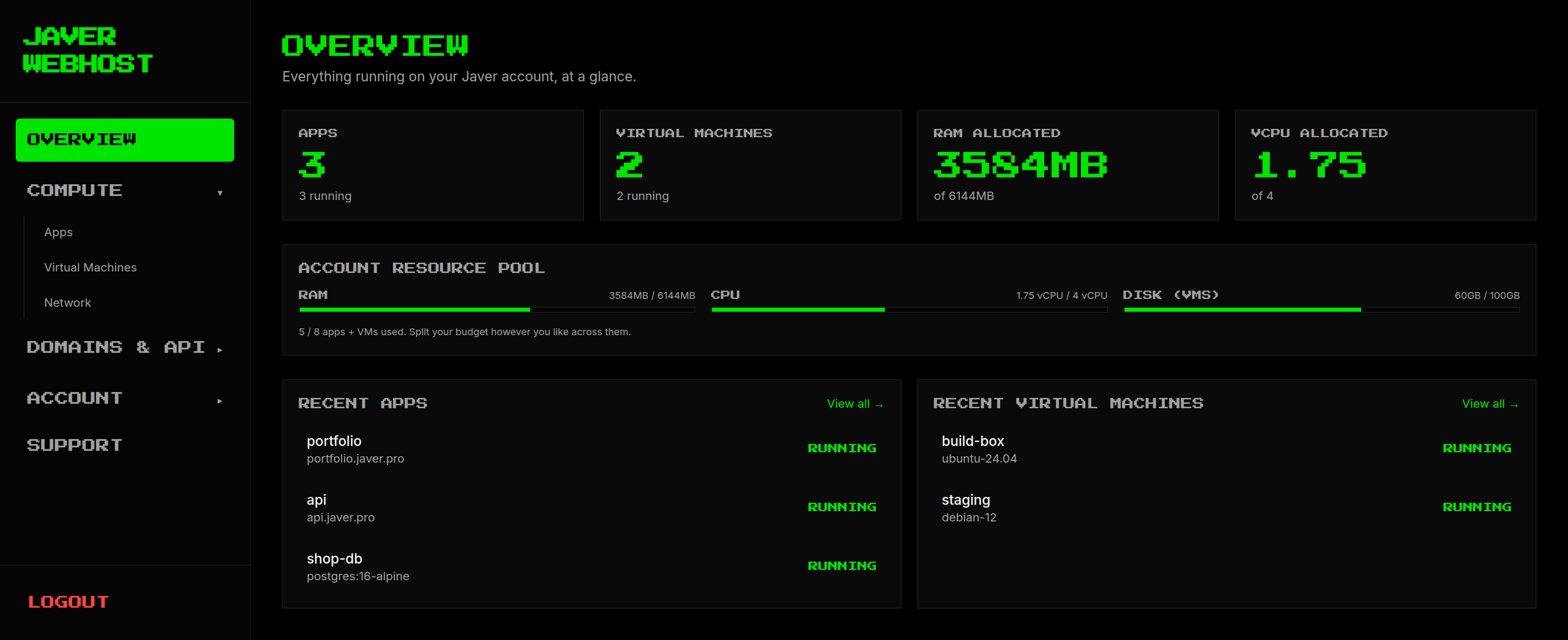
Apps and virtual machines side by side, with what is left of your memory, processor and disk across the top. This is the real panel, not a drawing of one.

The Javer control panel: a sidebar listing Overview, Compute, Domains and
              API, Account and Support, beside an overview of three running apps, two
              running virtual machines, and the account's memory, CPU and disk use.
// WHAT YOU GET

What you get,
free plan included.

Not a reseller. Real machines in Tokyo, run by the person who fixes them when they break. The free plan is a real plan, not a trial — it does not expire.

WE NEVER DELETE

If a payment fails we warn you, wait two weeks, then stop your machines. We do not destroy them, and we do not wipe the disk. Sort the card out and everything is where you left it.

A REAL FIREWALL

Priorities, allow and deny, rules aimed by tag. Write a rule, see exactly which machines it lands on.

TWO WAYS IN

A browser terminal, and a serial console that works when the machine's own network is broken — so a bad config is a fix, not a rebuild.

BACKUPS HOURLY

Offsite, included, with restore points you schedule and keep for as long as you choose. Not an add-on.

// HOW IT WORKS

Three steps.
No servers to manage.

Upload a folder, paste a repository link, or use the command line.

01

BRING YOUR APP

A zip, a public git URL, a connected GitHub repo, or one of our templates.

02

WE CONTAINERISE IT

No root, no extra privileges, read-only system disk, its own private network.

03

IT GOES LIVE

yourapp.javer.pro with a working certificate. Bring your own domain any time.

// NETWORKING

A firewall that can
actually say no.

Most firewalls at this price are an allow-list and nothing more. Yours is a real rule engine, and it shows you what is in force rather than asking you to guess.

WHAT A RULE CAN SAY 
Allow, or denyboth
Which machines it applies toby tag
Which addresses it coversany range
Inbound or outboundeither
Order when two rules disagreeyou set the priority
What is actually in force on a machineshown to you
Rules that cannot be removedlisted, not hidden
// PRICING

Start free.
Pay when you outgrow it.

The free plan runs one app, for as long as you like. Paid plans add virtual machines, and with them the firewall, the private network and both ways in.

FREE DEV

¥0
  • 512 MB memory
  • 0.25 vCPU
  • 2 GB disk
  • 1 app or database
START FREE

NANO

¥480/mo
  • 1 GB memory
  • 1 vCPU
  • 20 GB disk
  • 3 items
CHOOSE

PRO

¥780/mo
  • 3 GB memory
  • 2 vCPU
  • 50 GB disk
  • 5 items
CHOOSE

UR RICH, WE KNOW IT

¥1,500/mo
  • 6 GB memory
  • 4 vCPU
  • 100 GB disk
  • 8 items
CHOOSE

What a vCPU means here: a kernel-guaranteed share of a physical core, not a burst credit that runs out halfway through a traffic spike. Our machines are not identically specced — two have cores that are all the same, one mixes fast and slow cores, and we do not currently pin an app to a particular kind of core. So a vCPU is a promise about how much CPU time you are guaranteed, not about which core you land on.

// ONE POOL

One plan,
one pool to spend.

On a paid plan, memory and CPU (and the disk your virtual machines use) are one budget, not a separate box for every app. You decide how to divide it between your apps, databases and virtual machines.

// DATABASES

Every plan can run
a real database.

Postgres or MySQL, backed up every hour without you setting anything up, and yours to take away whenever you like. A database counts as one of your plan's items, so on the free plan you choose: one app, or one database.

// RECOVERY WINDOW

How far back
you can go.

Every plan can rewind a Postgres database to any second. The plan decides how far back that reaches.

FREE DEV

1 day

NANO

3 days

PRO

7 days

UR RICH, WE KNOW IT

14 days
// FAQ

Questions people ask
before they sign up.

Straight answers with the real numbers in them. If something here is unclear or you want a figure we have not published, ask us and we will publish it.

Where can I host a Discord bot for free?

Javer Webhost's Free Dev plan runs one Discord bot on 512 MB of memory, 0.25 vCPU and 2 GB of disk, with no credit card. The bot runs in its own hardened container on our hardware in Tokyo, Japan. Node.js apps and static sites run on the same plan.

Do I need a credit card to start?

No. The Free Dev plan asks for no card. It is a real plan rather than a trial: it does not expire, and it does not turn into a paid plan on its own.

What is the cheapest hosting with servers in Japan?

Ours starts at ¥0 for one app, and ¥480 a month for 1 GB of memory, 1 vCPU and 20 GB of disk. Every machine sits in Tokyo, with traffic routed through Cloudflare's edge network, so visitors in Japan reach it without a trip across the Pacific.

How much memory does a Discord bot need?

A small bot handling commands in a handful of servers is usually comfortable in 512 MB, which is what the free plan gives you. Bots that cache large guilds, hold voice connections or process images or audio want 1 GB or more.

What happens to my app if a payment fails?

We warn you, wait two weeks, then stop your machines. We do not destroy them and we do not wipe the disk. Sort the card out and everything is where you left it.

Can I run a Node.js app without managing a server?

Yes. Upload a folder, paste a public Git repository link, or use the command line. We containerise it and hand back a live yourapp.javer.pro address with HTTPS already working. Backups are hourly and offsite, included rather than sold as an add-on.

Running a Discord bot? Discord bot hosting covers what is different for bots: no web server needed, never put to sleep, and which file runs.

// TOKYO, JAPAN

Put something live
in ten minutes.